VisionOS

Spatial Design
Emerging Technology
Immersive Tutorials
How might we?
transform static digital tutorials into interactive, spatial experiences that are easier to follow, retain, and apply, especially for complex tasks like tech repairs or cooking?
Platforms
VisionOS Meta Quest iOS
Category
UI Design UX Research
Project Duration
4 Months



Brainstorming Sessions
Held 5 internal sessions to ideate onboarding flows, spatial interactions, and modular templates (e.g., stove/oven marker for cooking, screw guide for repair).
Competitor Analysis
Analyzed spatial learning and tutorial platforms (e.g., JigSpace, WikiHow VR, YouTube with AR extensions).
Identified gaps in interactive guidance, spatial UX fidelity, and lack of cross-context template systems for different task types (DIY, cooking, tech repair).
User Interviews
Interviewed 9 participants (ages 20–45) who regularly engage with instructional content online (YouTube, blogs, mobile apps).
7/9 struggle to pause / switch between content and task
6/9 expressed interest in hands-free visual instruction
5/9 found current AR tools either non-intuitive or overly complex
Persona Building
Constructed 3 personas from interview data:
DIY Dan: 32, uses YouTube for repairs, needs visual clarity
Chef Lila: 28, uses Instagram Reels for recipes, wants step control
Tinker Tim: 24, builds PCs, frustrated with switching apps during work
Affinity Mapping
Clustered responses into core themes:
Cognitive load during multitasking
Friction in switching between instruction and action
Demand for real-time, spatial, context-aware tutorials
Excitement around using headsets for hands-free guidance
Voice-first UI
Unobtrusive Design
I designed a voice-first interaction model that eliminates cognitive overload by streamlining commands to only the most contextually relevant actions. On Vision Pro, this voice layer acts as a spatial tutorial generation assistant, intelligently creating steps enriched with videos and images that are task-specific, enabling users to focus entirely on hands-on activity. The design follows Minimalism principles and prioritizes flow continuity in 3D space.
Empathetic Design
Tutorial Preview Page
Once the AI generates a tutorial, this page allows the user to go over the results, sources, and ingredients. Once everything is in order, they can proceed to the immersive viewer.
This page enables options and a means of knowing if they have all the right tools/ingredients to perform the task they asked for. If they don't approve of the tutorial, they can head to the 'Browse' page for others, 'See More', or the Voice search to regenerate with a prompt, or 'Continue' to proceed to completing the task.
Tutorial Views
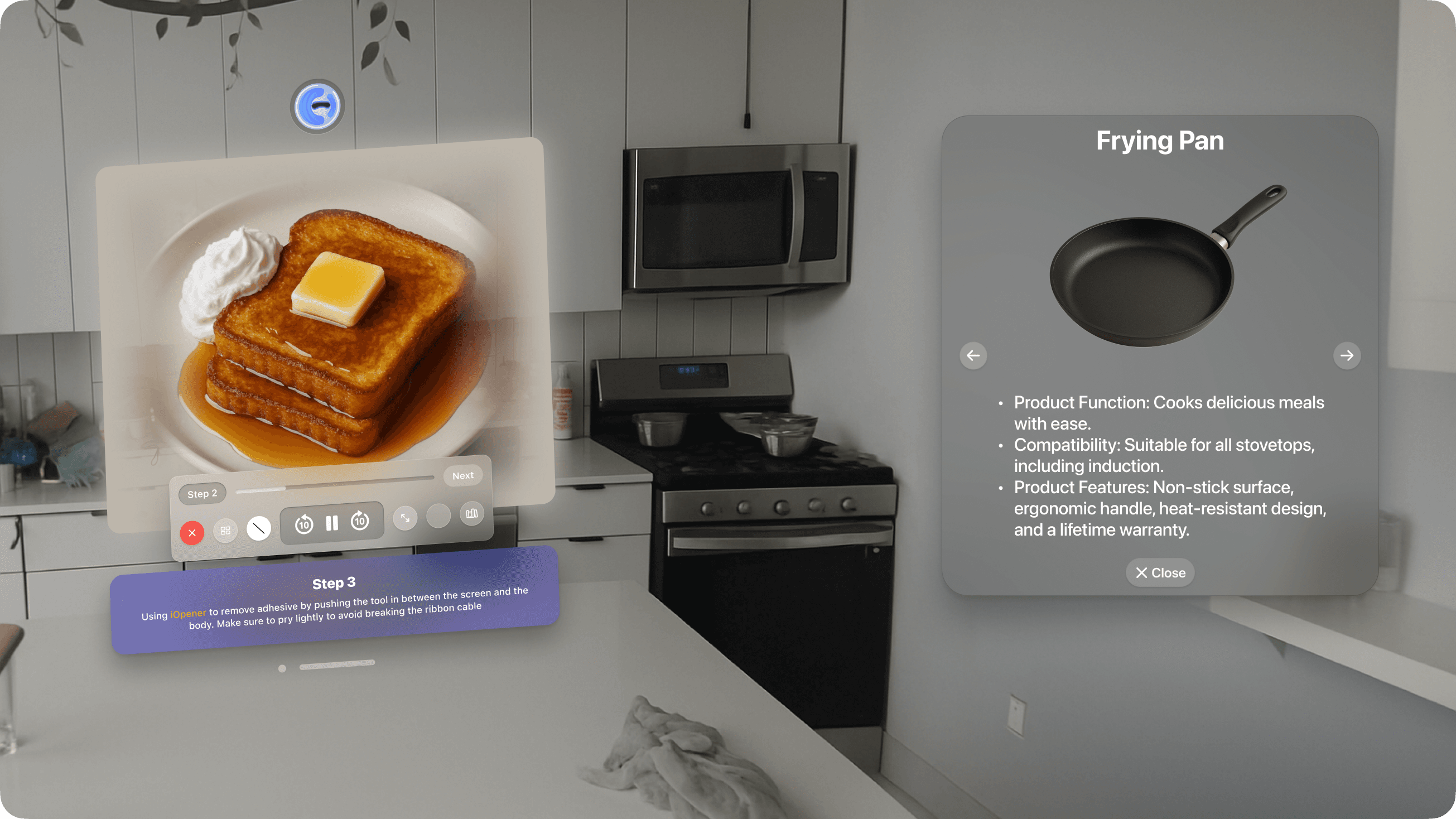
Immersive + Condensed Views
Designed two tutorial viewer sizes to suit all user needs. They can choose to be fully immersed to stay focused on a single task or take a better look at the step. The condensed view would allow more information and multi-app usage. From user testing, we found that users who are accustomed to spatial interfaces tend to have 3-4 applications running in their view, and the condensed view is best catered to them. Similarly, it is highly demanded in B2B settings where worker efficiency is preferred over content immersion.
Tutorial Gallery
Expansive Gallery view
My work focused on creating an intuitive and aesthetically pleasing user experience. I prioritized clarity and accessibility by organizing content into easily navigable sections, such as “Food”, "DIY", "Technology", etc., using distinct, colorful cards to highlight generated tutorials. This design not only enhances user engagement but also ensures that information is both discoverable and enjoyable to browse.
Video Controls
Reimagined Media Control
Due to the extensive functionalities of How2, I redesigned the native media controls. Now we have Steps, access to tutorials, a toggle to change the viewer mode, show or hide ingredients, and even information sources (described from left to right).
This design maintains a small footprint and ensures spatial efficiency without sacrificing functionality.
